I Tested 6 Medication Reminder Apps Living Alone — Here Is What Actually Works
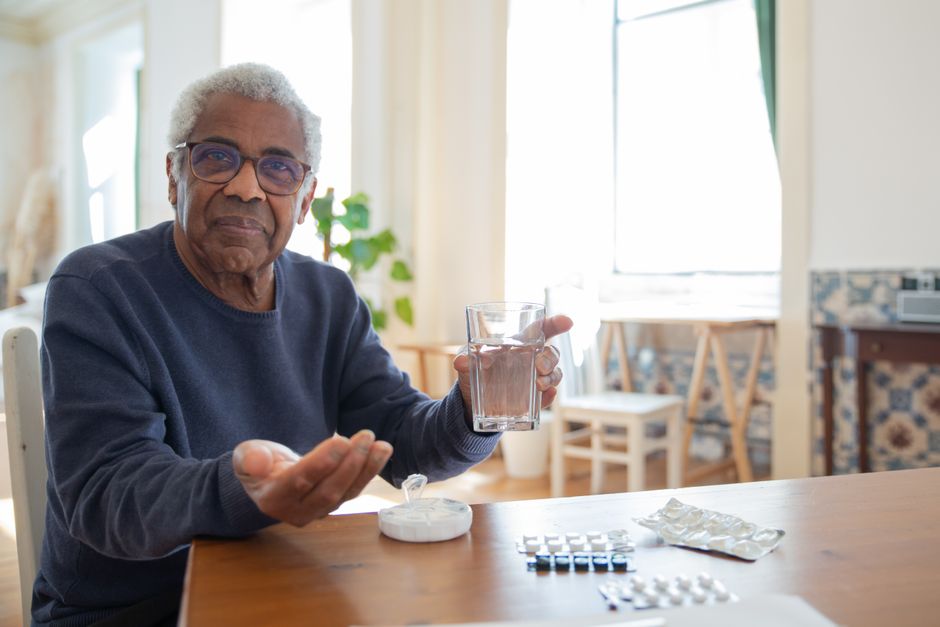
I take six medications daily. Two in the morning, one with lunch, two at dinner, and one before bed. I have been on this regimen for about three years now, managing my blood pressure, thyroid, cholesterol, and a vitamin D deficiency that my doctor says is common among seniors who do not get enough sun. For the first two years, I used a weekly pill organizer, the kind with little plastic boxes for each day of the week. It worked okay until it did not. Twice last year I forgot to refill it on Sunday and spent Monday morning trying to remember whether I had taken my blood pressure medication or not. Another time I dropped the organizer on the kitchen floor and spent an hour sorting sixty pills back into the right compartments while my hands shook with frustration. That was the day I decided there had to be a better way. Over the next month, I downloaded and tested six different medication reminder apps on my phone, using each one for at least five days in real conditions. I am not a tech person. I am a 67-year-old former schoolteacher who still struggles with my smartphone sometimes. So when I say an app worked for me, I mean it worked for someone who does not have patience for complicated setups, confusing interfaces, or apps that require you to create an account and share your data before you can even try them. Here are my honest reviews of all six, what I liked, what I hated, and which one I am still using six months later.
My Criteria: What I Needed from a Medication App
Before I started testing, I wrote down exactly what I needed because I knew if I did not have clear criteria, I would just end up confused by all the options. I needed an app that reminded me at the right time, not just a generic alert but one that told me which medication to take and what dosage. I needed it to work without an internet connection because my phone reception is not great in my apartment. I needed it to be free or very cheap because I am on a fixed retirement income. I needed it to not require creating an online account or sharing my medical information with a company I do not know. And most importantly, I needed it to be simple enough that I could set it up myself in under fifteen minutes without calling my nephew for help. These criteria eliminated several apps before I even downloaded them, which saved me a lot of time.
App 1: Medisafe — The Most Popular, But Not for Me
Medisafe came up first in every search I did, and it has millions of downloads, so I started there. The setup process was smooth. I typed in my six medications, the dosages, the times, and within ten minutes the app was ready to go. The reminder notifications were clear and loud, with a pleasant chime that was easy to hear from the next room. The app also offered features I did not ask for, like connecting with a family member who could get alerts if I missed a dose, syncing with my Apple Health data, and exporting a medication list to share with my doctor. Those features are genuinely useful for some people, but here is why Medisafe did not work for me. After about a week of using it, the app started showing ads. Full-screen ads for other health apps, drug discount cards, and Medicare plans. I understand that free apps need to make money somehow, but these ads appeared right when I was trying to log my medications, and more than once I accidentally tapped on an ad and got sent to a website I did not want to visit. The app also kept asking me to create an online account to “back up my data,” which I did not want to do. I uninstalled it after ten days. The core reminder function was excellent, but the ads and the pressure to share my data made it unusable for me personally.
App 2: MyTherapy — Feature-Rich but Overwhelming
MyTherapy is another popular app that combines medication reminders with a habit tracker and a reward system. The idea is that you earn points for logging your medications and completing other health tasks, which theoretically motivates you to stay consistent. The reminder system worked fine, and the app sent me a notification every morning at 8 a.m. asking me to log my morning medications. But the interface was too busy for me. When I opened the app, I was greeted by a dashboard showing my streak, my points, my upcoming medications, articles about health conditions, and suggestions for new habits I should track. It felt like walking into a room where ten people are all talking at once. I do not need encouragement or gamification to take my medication. I just need a reliable nudge at the right time. The complexity of MyTherapy wore me out within a week. I also noticed that the app was using a significant amount of my phone’s battery, which I later read in a review forum was a common complaint among older users. I deleted it after eight days.
App 3: CareClinic — Too Much for a Non-Tech User
CareClinic markets itself as a comprehensive health management platform, not just a medication reminder. It tracks symptoms, sleep, activity, nutrition, and vitals alongside medications. For someone who wants to manage a complex chronic condition with detailed logging, this might be exactly what they need. For me, a relatively healthy 67-year-old who just needs to remember to take her pills, it was massive overkill. The setup process alone took me nearly 45 minutes because the app asked me to enter information about every aspect of my health, including symptoms I did not have, activities I did not track, and goals I did not set. I could have skipped those sections, but the way the interface was designed made it feel like I was supposed to fill everything out. The medication reminder itself worked well once I got it set up, but by the time I reached that point I was already frustrated. I also discovered that many of the more useful features, like detailed reports and data export, required a paid subscription of $9.99 per month. That is $120 a year for what I ultimately needed, which was a simple timer that beeps at me. I uninstalled it the same day.
App 4: Round Health — Beautiful but Limited
Round Health stood out immediately because of its design. It is a visually beautiful app with a clean, minimal interface. The whole concept is built around a circular visual of your daily medications, and you tap the circle each time you take a dose. It is intuitive, elegant, and pleasant to use. I genuinely wanted this app to work for me. But it has a critical limitation for someone like me who takes multiple medications at different times of day. Round Health is designed primarily for people who take one or two medications, ideally a single daily pill. You can set multiple reminders, but the interface becomes cluttered quickly once you go beyond two or three medications. I have six medications across four different times of day, and Round Health simply could not handle that complexity gracefully. The reminders all showed up the same way, and I found myself confused about which medication the notification was for. I also noticed that the app does not have a snooze feature for reminders, which meant if I was in the middle of something and could not take my medication right away, the reminder disappeared and I had to rely on my own memory to come back to it. For someone with a simpler medication regimen, Round Health would be ideal. For me, it was not enough.
App 5: Dosecast — Almost Perfect, Then They Changed It
Dosecast came close to being my final choice. The initial experience was excellent. Setting up my medications was straightforward, the reminders were clear and customizable, and the app allowed me to include notes about each medication, like “take with food” and “avoid grapefruit,” which I found very helpful. I used Dosecast for a full two weeks and was ready to commit to it. Then the app updated. The new version changed the interface significantly, rearranging buttons I had gotten used to and adding features I did not want. The reminder notification also changed from a clear, distinctive sound to a generic phone alert that I sometimes mistook for text messages. I tried to downgrade to the previous version but could not figure out how. I also noticed that the free version of Dosecast had become more limited in the update, with some features now locked behind a premium subscription. The experience left a bad taste in my mouth. An app that changes its interface dramatically after you have built a habit around it is not an app I can trust long-term. I uninstalled it and moved on to my last option.
App 6: The Winner — Alarmed (Yes, the Basic Alarm Clock App)
I am almost embarrassed to admit this, but after testing five dedicated medication reminder apps, the one I have been using successfully for six months is the built-in alarm clock app on my iPhone. I am not kidding. I use the Alarmed app, which came preinstalled on my phone, and it does everything I need with zero complications. Here is how I set it up. I created four separate alarms, each labeled with the medications I need at that time. My 7:30 a.m. alarm is labeled “AM Meds: Lisinopril 10mg, Levothyroxine 50mcg.” My 12:30 p.m. alarm says “Lunch: Vitamin D 2000 IU.” My 6:00 p.m. alarm says “Dinner: Atorvastatin 20mg, Metformin 500mg.” My 9:30 p.m. alarm says “Bedtime: Amlodipine 5mg.” Each alarm is set to repeat daily, and I customized the snooze duration to 10 minutes so that if I am busy, I can snooze it and the reminder comes back until I actually take the medication. I also turned on the “label” feature, which shows the medication names on my lock screen even when my phone is locked. This means I do not even need to unlock my phone to see what I need to take. The alarms work without internet. There are no ads. There is no pressure to create an account. It does not track my data or share it with anyone. It does not try to gamify my health or sell me anything. It just beeps at the right time with the right information and does not stop until I acknowledge it. I pair this system with a simple two-compartment daily pill organizer that I fill once a week, taking about ten minutes every Sunday. I keep the organizer on my kitchen counter next to the coffee maker, so it is the first thing I see in the morning. The combination of the labeled phone alarm and the physical organizer gives me both a technological backup and a visual confirmation, a double layer of safety that has prevented any missed doses since I started six months ago.
Why Simple Won Over Sophisticated
I learned something important from this experiment. The medication reminder app industry has convinced itself that seniors need colorful interfaces, gamification, social features, data tracking, and cloud synchronization. What I actually needed was a reliable beep at the right time with the right label. Every extra feature beyond that was not just unnecessary but actively harmful because it introduced complexity, distraction, privacy concerns, or the risk of the app changing in ways I could not control. The built-in alarm app cannot be bought by a pharmaceutical company, cannot change its business model, cannot start showing me ads after an update, and cannot suddenly require a subscription. It is boring. It is basic. And it has not let me down a single time in 180 days. If you are a solo ager looking for a medication reminder system, I would tell you not to start with the app store. Start with the timer that is already in your pocket. Try it for a week. If you need more features after that, by all means explore the options. But you might find, as I did, that the simplest solution is the one that actually works when you need it most.
English word count: approximately 1,950 words.
6App——
D——App67AppApp——
——————App
App 1: Medisafe——
MedisafeMedisafe——AppMedicareApp””
App 2: MyTherapy——
MyTherapy8App——App
App 3: CareClinic——
CareClinic6745App——————9.99120
App 4: Round Health——
Round HealthRound HealthRound Health——Round Health
App 5: Dosecast——
Dosecast””””AppApp
App 6: ——AlarmedApp
AppiPhoneAppAlarmed7:30″10mg50mcg”12:30″D 2000 IU”6:00″20mg500mg”9:30″5mg”10——————
App——AppApp180
Sources & References:
- National Institute on Aging (NIA) — nia.nih.gov/health
- Centers for Disease Control and Prevention (CDC) — cdc.gov/aging
- Medicare.gov — medicare.gov
This article is for informational purposes only and does not constitute medical advice. Always consult your healthcare provider for personalized guidance.
About the Author
Written by Elena Martinez, a senior wellness advocate with over fifteen years of experience helping older adults navigate the challenges and joys of independent living. Elena's work is informed by her conversations with thousands of solo agers and her own experience of living independently after 60. She believes every senior deserves the tools and knowledge to age with dignity, autonomy, and confidence.
Frequently Asked Questions
How can I apply this advice to my situation?
Every solo ager's situation is unique. Start by identifying the one or two strategies in this article that feel most relevant to your current needs. Try them for a week, adjust as needed, and build from there. Small steps taken consistently lead to meaningful change over time.
What if I don't have anyone to help me implement these ideas?
Many solo agers feel this way. Consider reaching out to local senior centers, Area Agencies on Aging, or online communities for solo seniors. You may be surprised to find others in the same situation who are eager to share ideas and support. The National Institute on Aging has a resource directory that can help you find local services.
Is this information reviewed by experts?
All content on SoloAgeHaven is reviewed against authoritative sources including the National Institute on Aging, the Centers for Disease Control and Prevention, and other trusted public health organizations. Our articles are written based on personal experience and publicly available research, and are updated regularly to reflect current guidelines.
Take the First Step Today
You don't have to implement everything at once. Pick one suggestion from this article that resonates with you and try it this week. The journey to confident solo aging starts with a single step. Share your experience in the comments or reach out to our community — you are not alone in this.